Slow Motion That Still Cuts on the Beat
Pick the shots, or a whole part of the song, and Onset Engine plays them at half speed with smooth in-between frames. The cuts stay on the beat and the video keeps its length, so the drop hits exactly where it did.
Slow Down the Moment, Not the Song
Slowing a clip in a normal editor pushes everything after it out of time: you trim, re-sync and nudge until the next cut lands again. Onset Engine does that part for you. A slowed shot fills the same beats it filled before, so every cut after it stays where the music wants it.
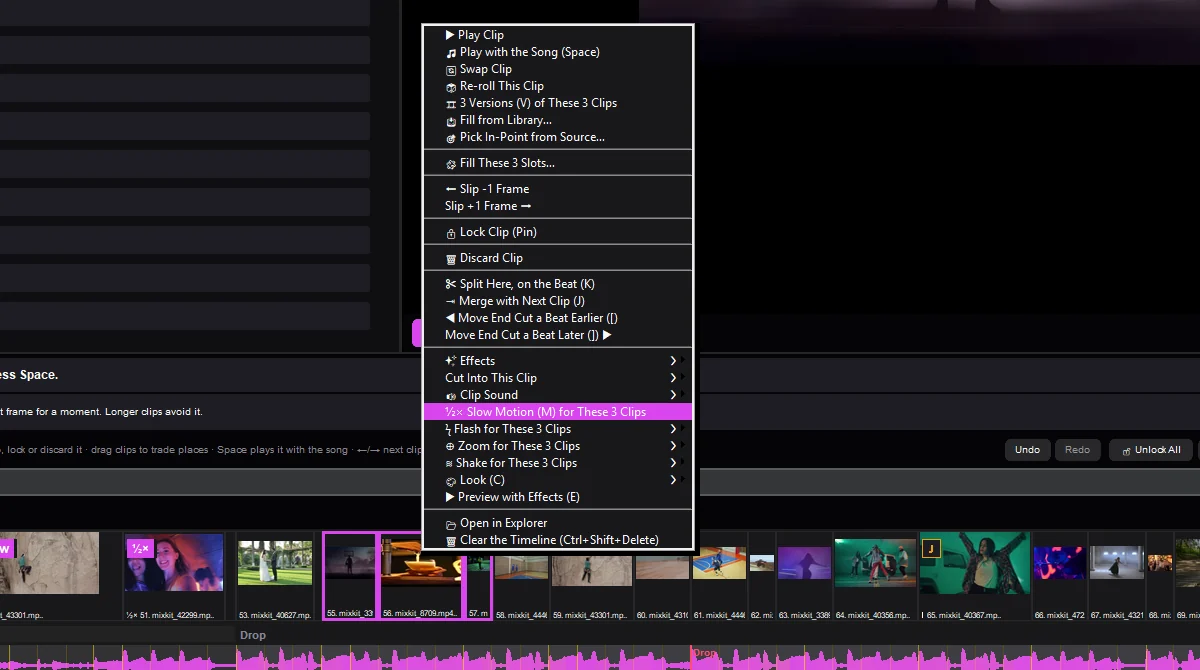
- ✓ Any shots: select them on the timeline and press M, or right-click a shot
- ✓ A whole part of the song: slow motion on the drop, the bridge or the intro, through every Re-cut
- ✓ Smooth: in-between frames are drawn from the movement itself, at any frame rate
- ✓ The clip's own sound slows to match
Or Just Say It
Type "slow mo on the drop" in the command bar. Onset Engine shows what it understood and outlines the shots it will change before anything happens; press Apply, and one Ctrl+Z takes it back.
Slow motion on a part of the song lasts: it shows in the Direction list at the top of the settings, holds through every Re-cut, and ✕ takes it away.

How to Add Slow Motion on the Beat
Make a First Draft
Add your videos, pick a song and let Onset Engine cut the first draft on the beat.
Choose What to Slow
Select shots and press M, or slow a whole part of the song from Direction's + Add direction.
Play It Back
Slowed shots are marked ½× on the timeline, and Space plays them slowed, with the song.
Render or Export
Render up to 4K, or export the timeline to Premiere Pro, DaVinci Resolve or OpenTimelineIO with the speed carried over.
Frequently Asked Questions
How do I add slow motion to a music video without losing the beat?
In Onset Engine, select the shots on the timeline and press M, or tell the command bar "slow mo on the drop". The slowed shots play at half speed but fill the same beats they did before, so every cut stays on the beat and the video keeps its length.
Can I slow down a whole part of the song?
Yes. Choose a part of the song (the drop, a chorus, the intro) and give it slow motion from Direction's + Add direction, or say it in the command bar. It lasts through every Re-cut and shows in Direction, where one click takes it away.
Does slow motion look smooth on 30 fps footage?
Onset Engine draws the in-between frames from the movement in the clip, so slowed shots play evenly at any frame rate.
Does the slow motion carry into Premiere Pro or DaVinci Resolve?
Yes. Timeline exports for Premiere Pro, DaVinci Resolve and OpenTimelineIO keep each slowed shot's speed, so you can finish the edit there.
Is the slow motion video editor free?
The free Demo includes slow motion and every other feature; it renders the first minute at 720p with a watermark. Onset Studio is a one-time purchase of $79 and renders the whole video in up to 4K.
Ready to Try It?
Download the free demo and see the results on your own footage. One-time purchase, no subscriptions.