Camera Shake, Flash and Zoom, Right on the Beat
A white flash on every hit in the drop, a camera shake on every beat of the chorus, a slow zoom in through one shot. Onset Engine knows where the song's hits, beats and cuts are, so you choose the effect and where it goes, and it lands on time without a single keyframe.
Pick the Effect, Pick Where It Goes
In a timeline editor, a shake on every beat means finding every beat and keyframing each one. Onset Engine has already found them: it analyzes the song's beats, bars and hits before it makes the first cut.
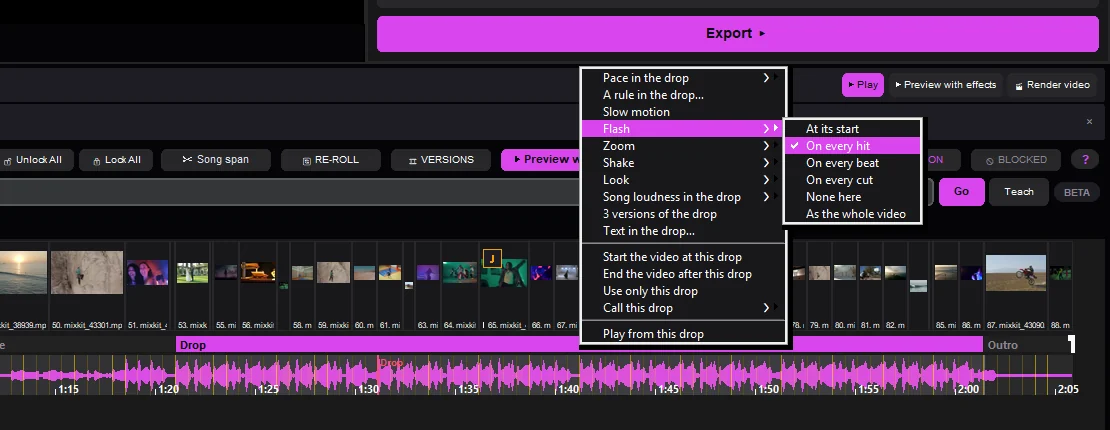
- ✓ Flash: a white flash on every hit, every beat or every cut, or a flash into chosen shots
- ✓ Zoom: a punch on the beat, or a slow zoom in through a shot
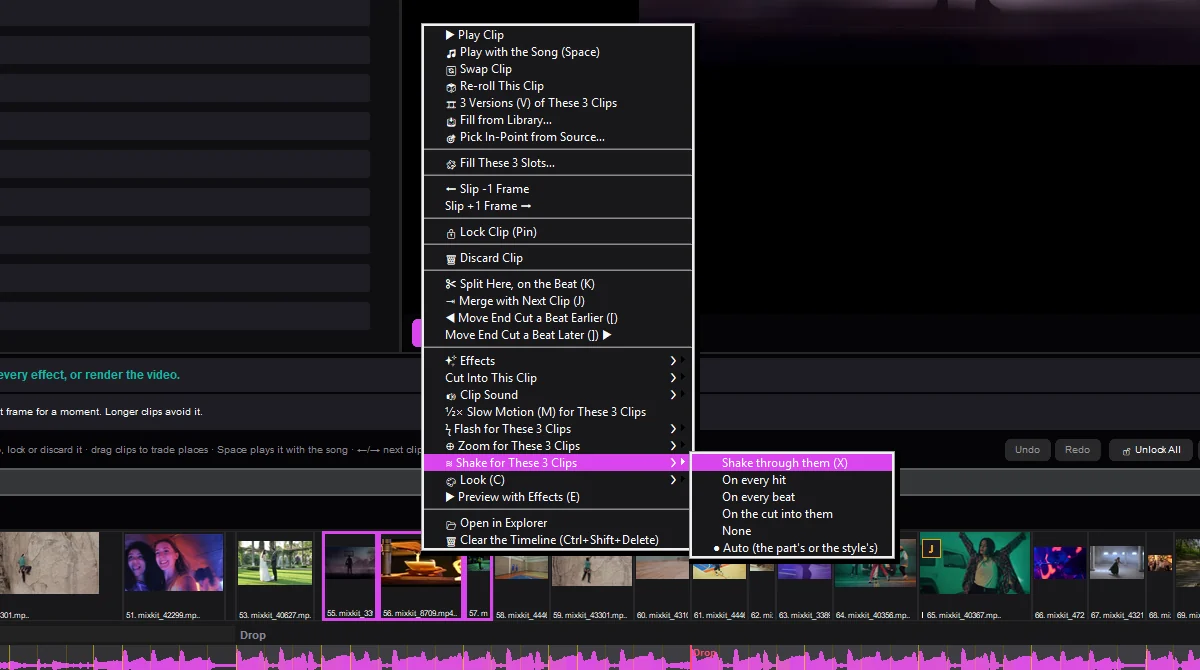
- ✓ Shake: a jolt on the hits, or a shaking camera through a shot. It moves the whole picture, whatever the framing
- ✓ Any scope: the shots you select, a whole part of the song, or the whole video
Three Ways to Ask
Keys: select shots and press F for a flash, Z for a zoom, X for a shake.
Mouse: right-click a shot, or open Direction's + Add direction for the shots, a part of the song or the whole video.
Words: tell the command bar "flash on every hit in the drop" or "shake shots 5 to 7". It shows what it understood first.
A part's effect lasts through every Re-cut and shows in Direction, where ✕ takes it away. A shot's own choice wins over its part's, and one Ctrl+Z undoes any of it.
Or Let the Song Decide
For the whole video, Camera hits under More options puts the zoom punches and camera jolts where the kick drum lands, so a calm song stays calm and a club track hits hard. Choose the kicks, every beat, or none at all, and keep your own choices for the parts that need them.

Frequently Asked Questions
How do I add a camera shake effect on the beat?
In Onset Engine, select the shots and press X, or tell the command bar "shake on every beat in the drop". Direction's + Add direction does the same for any part of the song. The shakes land on the song's beats or hits, which Onset Engine finds when it analyzes the song.
Can I add a flash transition on every hit?
Yes. Choose Flash on every hit for a part of the song or the whole video, or say "flash on every hit in the drop" in the command bar. You can also flash into chosen shots: select them and press F.
Do I need keyframes or plugins?
No. The effects are drawn when the video renders, on the beats Onset Engine already found. There is nothing to keyframe and nothing to install.
Can I take an effect off one part of the song?
Yes. Every lasting choice shows in the Direction list, grouped by where it applies; ✕ takes one away and Ctrl+Z brings it back.
Is it free?
The free Demo has every effect; it renders the first minute at 720p with a watermark. Onset Studio is a one-time purchase of $79 and renders the whole video in up to 4K.
Ready to Try It?
Download the free demo and see the results on your own footage. One-time purchase, no subscriptions.