Make a Year in Review Video From Your Photos and Clips
Pick a song and Onset Engine takes one moment from every day, or every week, of your photos and clips, puts them in date order and cuts each one on the beat. A whole year in a few minutes, made on your PC: your pictures never leave it.
A Bit of Every Week, in Order
A year on your phone is thousands of photos and hundreds of short clips. Going through them by hand to pick one a day takes evenings. Choose Year in review and Onset Engine reads when each photo and clip was taken, groups them by day or by week, and keeps one moment from each: one you gave 5 stars if there is one, otherwise a clip, the liveliest.
Then it cuts them to your song, in date order, every cut on the beat. Pick a year, the last 12 months or every date you have, and you see the whole year before you start.
One Second a Day, or One Moment a Week
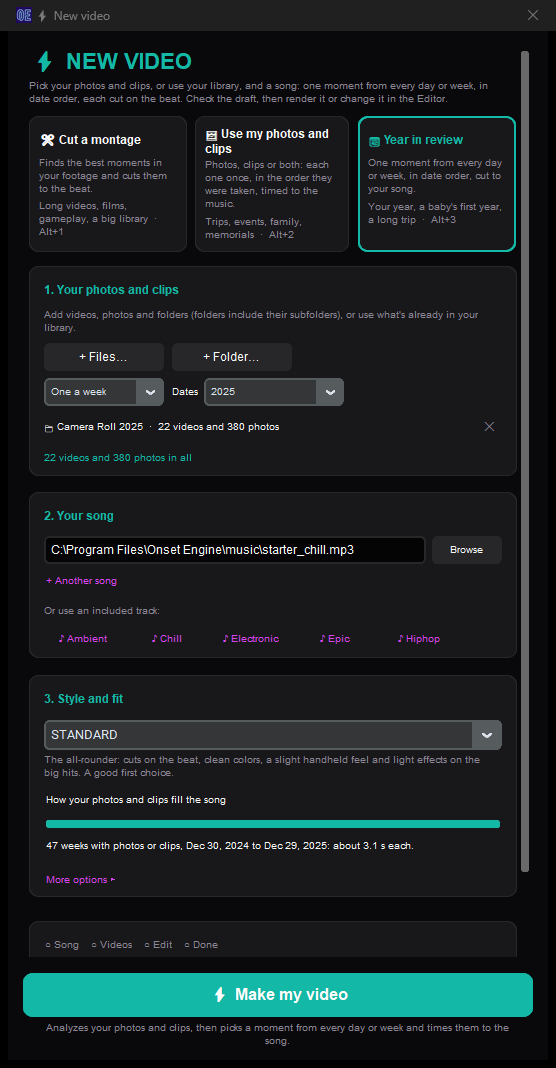
One a day shows a moment from every day you have a photo or clip of, about a second each on a typical song: the one-second-a-day video, made from the pictures you already took, with no app to remember every evening. One a week gives each week a few seconds, so each moment has time to breathe.
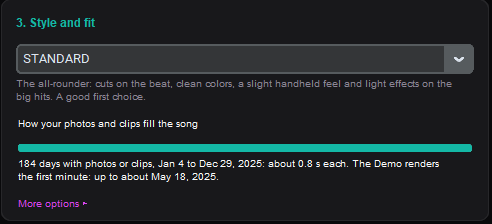
A line under your song says how your days fill it before anything is analyzed, for example 184 days with photos or clips, Jan 4 to Dec 29: about 0.8 s each.
- ✓ More days than the song holds: days are left out evenly through the year, so no month disappears, and you're told which
- ✓ Fewer: the video ends with your last day, on a bar line, and the music fades out
- ✓ Weeks with nothing: skipped, and the longest gap is named
- ✓ Photos and clips together: every photo moves across its shot, every clip shows its liveliest moment
How to Make a Year in Review Video
Add Your Year
Open New video (or File > New year in review) and pick Year in review, or say "a year in review of my photos". Add your camera roll: a folder of photos and phone videos, JPEG, HEIC and the rest, copied to your PC.
A Day or a Week
Choose One a day or One a week, and the dates: a year, the last 12 months or all of them.
Pick a Song
One song, or several in a row for a longer video. The beats, bars and drops are found for you, and the line under it shows how your days fit.
Check and Render
A draft comes first. Press R on any moment for another one from that day, lock the ones you love, then render in up to 4K, or vertical for your phone.
Your Year, a Baby's First Year, a Long Trip
Any stretch of dated photos and clips works the same way. A family's year, kept for the holidays. A baby's first twelve months, one moment a week. A season of a team, a year of a garden, a gap year abroad. Choose the dates, and the video follows the calendar.
Want every photo and clip from one day or one trip instead, in the order they were taken? That is Use my photos and clips, right next to Year in review.

Private, and Yours to Keep
A year of photos is a year of your family, your friends and your home. Onset Engine runs on your Windows PC: the analysis, the edit and the render all happen there, with no account and no upload.
It is a one-time purchase, $79, with no subscription. The free Demo includes Year in review and renders the first minute at 720p with a watermark, and the line under your song says how far into your year that minute reaches, so you can see the first months of your own year cut to your own song before you buy.

Frequently Asked Questions
How do I make a year in review video from my phone's photos?
Copy your photos and videos to your PC, open Onset Engine's New video and choose Year in review. Add the folder, pick One a day or One a week and the year, and a song, then press Add and make the video. It keeps one moment from each day or week, in date order, cuts each on the beat and shows you a draft first.
Can I make a one second a day video on my PC?
Yes. Choose Year in review with One a day: each day you have a photo or clip of shows one moment, about a second each on a typical song, in date order. If the year has more days than the song holds, days are left out evenly and you're told which; a longer song, or One a week, fits them all.
Do I have to film a second every day?
No. It works from the photos and clips you already have, dated as your phone or camera stored them. Days you took nothing are simply skipped, and if a few weeks are empty the end of the job names the longest gap.
How does it choose the moment for each day?
It takes one you rated 5 stars first. Otherwise it prefers a video clip to a photo, since a moment that moves says more, and among clips the liveliest. Among photos alone, it takes the one taken nearest the middle of the day. Re-roll gives every day another of its best moments, and R on a single shot gives that day its next one.
What if some of my photos have no date?
Photos are dated as the camera or phone stored them, and videos by the date they were recorded, or by the file's date when they have none. Files with no date at all are left out and counted. If many photos are dated the same day, as copied files often are, you're told, and that day shows just one of them.
Is the year in review video maker free?
The Demo is free and includes Year in review. It renders the first minute of your video at 720p with a watermark, and tells you how far into your year that minute reaches. The full version is a one-time purchase of $79 and renders the whole video in up to 4K.
Ready to Try It?
Download the free demo and see the results on your own footage. One-time purchase, no subscriptions.