Automatic Video Editor - Drop Footage, Get a Finished Edit
You have a folder of clips and a music track. The automatic video editor analyzes every frame, scores motion, maps musical structure, and assembles a complete beat-synced edit - no timeline dragging, no manual cutting, no Premiere Pro.
What "Automatic" Actually Means
Most "auto edit" tools just trim silence or split on scene changes. That's not automatic editing - that's preprocessing. A real automatic video editor needs to make the same decisions a human editor makes:
- ✓ Which clips are worth using? Not every clip is good. An auto editor needs to score motion, skip static and black frames, avoid near-duplicate shots, and keep the mix visually varied.
- ✓ What order should they go in? Clips need to flow - building energy, varying shot types, avoiding visual repetition.
- ✓ Where should each cut land? Cuts on musical beats feel intentional. Cuts between beats feel amateur. The ability to sync video to music automatically is everything.
- ✓ How should the energy arc? Calm footage during quiet sections, high-intensity clips on drops. The edit should breathe with the music - the same principle that drives a dedicated music video editor.
Onset Engine does all four - automatically - using AI that actually understands what's in your footage.
How the Auto Editor Works
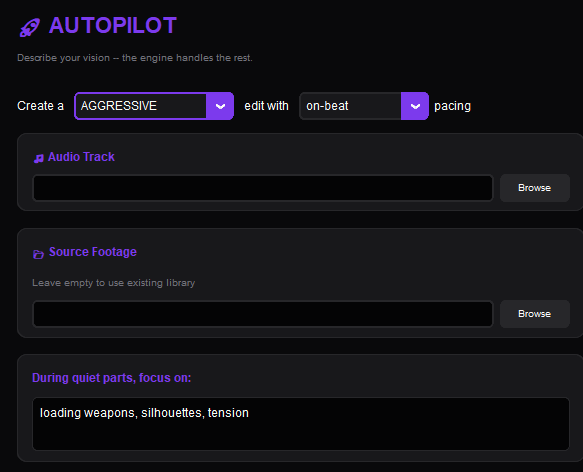
Onset Engine's New video button runs a complete automatic editing pipeline built on two AI systems working together:
- ✓ AI Vision Analysis: Every clip gets a searchable fingerprint of what's in it during ingest. The AI understands what's visually happening - not just motion levels, but "person dancing" vs. "crowd cheering" vs. "sunset landscape"
- ✓ AI Audio Analysis: Your music track gets decomposed into beats, onsets, energy curves, and structural sections (intro, build, peak, outro). Every cut is timed to land on a musical accent
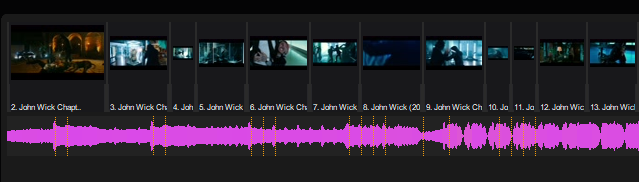
- ✓ Energy-Mapped Assembly: The auto editor maps clip energy to musical energy. Calm, atmospheric clips land during quiet sections. High-motion, dramatic clips land on drops and peaks
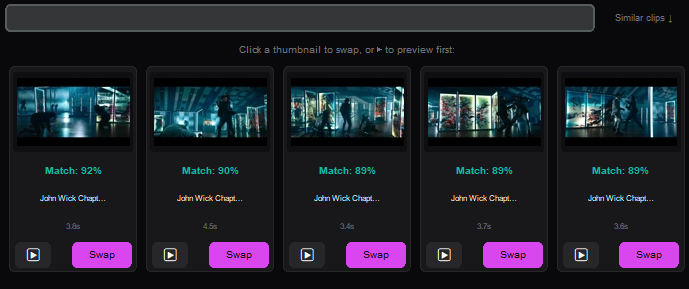
- ✓ Diversity Guard: The AI checks how closely clips match each other, so visually similar clips don't play back-to-back. Every beat gets a semantically distinct visual
The Automatic Editing Workflow
Drop Your Clips
Point Onset Engine at a folder of video files. The AI ingests and indexes every clip - building a searchable semantic library.
Drop Your Track
Select a music file. The audio engine maps every beat, energy curve, and section transition automatically.
Choose a Preset
AGGRESSIVE for hard-hitting, bass-heavy tracks. PRESTIGE for a polished film look. STANDARD for clean colors and cuts on the beat - a good first choice. HYPNOSIS for dreamy ambient and trance.
Render or Export
Get a finished MP4 in minutes, or export an .otio timeline to refine in Premiere Pro or DaVinci Resolve.
Auto Edit, Then Refine
Automatic doesn't mean "take it or leave it." Onset Engine's auto editor generates a complete first cut that's typically 80% of the way to a finished edit. From there you have options:
- ✓ Render directly - if the auto edit is good enough, export and ship
- ✓ Re-roll for a new edit - same clips, same music, completely different edit. Each generation is unique
- ✓ Export .otio to your NLE - open the AI's timeline in Premiere or Resolve, swap a few clips, color grade, and export. The auto editor did 4 hours of grunt work in 2 minutes
- ✓ Lock clips and re-generate - keep the clips you love, re-roll the ones you don't. Iterative refinement without starting over
One-time purchase. 100% local. Your footage never leaves your machine. No cloud processing, no subscriptions, no per-render fees.
Frequently Asked Questions
Is there an AI that automatically edits videos?
Yes. Onset Engine uses visual AI and AI beat detection to automatically select clips, sync them to music beats, and render a complete edit with transitions and cinematic VFX. During ingest, the AI builds a searchable fingerprint of every clip in your library, so it understands what's on screen - not just how much it moves. It then maps your music track's beats, energy curves, and section boundaries to build a pacing blueprint. The result is a complete, beat-synced edit assembled in under 2 minutes. Unlike cloud-based tools, Onset Engine runs entirely on your local machine with zero uploads and zero per-render fees.
Can AI edit my video for me?
Onset Engine's New video does exactly this. Pick your video files or folders, pick a song, choose one of 9 style presets (AGGRESSIVE for hard-hitting, bass-heavy tracks, PRESTIGE for a polished film look, SENSUAL for slow, moody songs, etc.) and a pace, and click Make my video. The AI handles clip selection via semantic matching, beat-synced sequencing via AI beat detection, transitions, and visual effects - producing a draft of the whole song, cut to the beat and opened in the Editor. From there, you can render it as it is, re-roll for a completely different edit, lock your favorite clips and re-generate the rest, or export the timeline as an .otio file to Premiere Pro or DaVinci Resolve for manual refinement.
What is the best free automatic video editor?
Onset Engine offers a free demo that runs the full automatic editing pipeline on your own footage - all 9 presets, v3 Driver AI pacing, New video, and AI visual analysis work without restriction. The demo limits are output-focused: 720p renders with a watermark, VFX disabled, and 1-minute DJ Mode sessions. This lets you verify the AI pipeline works with your footage and hardware before purchasing. The full version is a one-time purchase - $29.99 for Core (1080p, unlimited DJ Mode) or $59.99 for Studio (4K, OTIO export) with the current launch discount. No subscription, no per-render fees, unlimited exports.
Is there a free AI video editor with no watermark?
Onset Engine's paid tiers - Core at $29.99 and Studio at $59.99 (one-time purchase, current launch discount) - produce watermark-free exports with no limits on resolution, render count, or export format. Core renders at 1080p/60 FPS with all VFX and Curator tools included. Studio adds 4K/60 FPS, OpenTimelineIO (.otio) NLE export for Premiere Pro and DaVinci Resolve, triptych mode, and highlights export. The free demo lets you evaluate the full AI editing pipeline before buying - all presets and analysis features work, with output limited to 720p watermarked renders.
Ready to Try It?
Download the free demo and see the results on your own footage. One-time purchase, no subscriptions.